System requirements
Please refer to this page:
system requirements.
Public version with full sources is now available at github vcp page.
Information below is provided for historical reasons only.
Installation notes
After successful installation, following changes are required to be made in Borland Delphi/C++Builder IDE in order for you to be able to re-compile our demos, or build own applications with Evaluation version of VC 2.5 components:
- add VC 2.5 Evaluation components package to the components palette:
- select Project\Options menu command and select Packages tab;
- press Add... button;
- browse to the folder where VC 2.5 Evaluation product was installed and select the following file:
common\vc2eval_40.bpl -- for Borland Delphi 4.0;
common\vc2eval_50.bpl -- for Borland Delphi 5.0;
common\vc2eval_60.bpl -- for Borland Delphi 6.0;
common\vc2eval_70.bpl -- for Borland Delphi 7.0;
common\vc2eval_90.bpl -- for Borland Delphi 2005;
common\vc2eval_A0.bpl -- for BDS 2006;
common\vc2eval_B0.bpl -- for CodeGear RAD 2007;
common\vc2eval_C0.bpl -- for CodeGear RAD 2009;
common\vc2eval_D0.bpl -- for CodeGear RAD 2010;
common\vc2cbEval_50.bpl -- for Borland C++ Builder 5.0;
common\vc2cbEval_60.bpl -- for Borland C++ Builder 6.0;
- press Open to install the package;
- add VC 2.5 Evaluation components package to run-time packages:
- make sure "[x] Build with runtime packages" check box is checked;
- make sure "vc25eval_X0" (for Delphi X.0) or "vc25cbEval_X0" (for C++Builder X.0) is listed in the Runtime packages edit box:
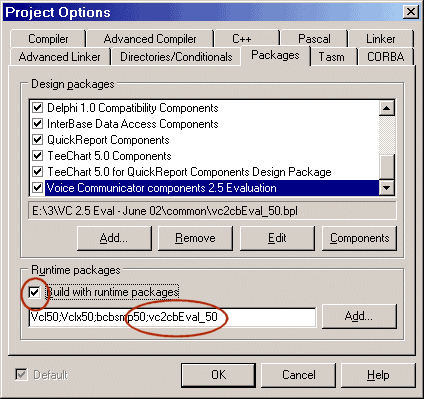
- select Directories/Conditionals tab on the Project Options dialog, and add common\ path from VC 2.5 Evaluation installation to Search\Include path in project options:
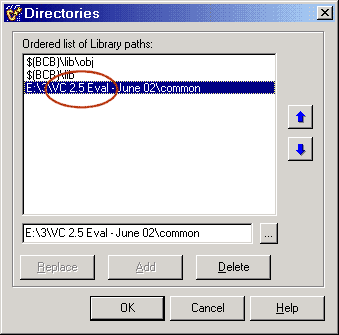
Uninstalling
To remove VC 2.5 Evaluation from your environment, make sure you have removed the components package from Delphi/C++Builder IDE before starting uninstallation program.
Following limitations are applied to the Evaluation version of VC 2.5 components:
- runtime package vc2eval_X0.bpl (for Delphi X.0) or vc2cbEval_X0.bpl (for C++Builder X.0) must be located somewhere in your PATH, or in C:\Windows\System32 for example;
- wave components are limited to handle about 300 seconds of audio only;
- WAVe file reading component (TunavclWaveRiff class) is limited to load first 30 seconds of audio only;
- TCP/IP stream components are limited to receive about 16 MB of data only;
- ipServer component (TunavclIPInStream class) is limited to support maximum 3 clients only;
NOTE: none of this limitations are applied to VC 2.5 Personal or Enterprise licenses.